
Compare

Lupus Labs vs think-cell for roadmap slides

think-cell is a serious PowerPoint add-in. Lupus Labs is the lighter option when you mainly need one clean roadmap slide without the weight of a broader add-in workflow.

Compare

When a lighter workflow is the more practical choice

If both options can produce a roadmap slide, the better fit is usually the one that gets you to a usable result with less setup and less repeat friction.

Why teams start looking for an alternative

Most teams do not start looking for a think-cell alternative because think-cell is weak. They start looking because the immediate task is narrower than the full add-in: one steering slide, one client roadmap, one recurring PMO update.

  • think-cell is designed as a full PowerPoint add-in, so the evaluation naturally includes installation, activation, and a broader presentation workflow.
  • That can be the right trade-off for teams that need many chart types, libraries, and tighter PowerPoint-native tooling across many slide formats.
  • It can also feel heavier than necessary when the real question is simply: how fast can we get one roadmap slide into tomorrow's deck?
When the browser workflow is the better fit

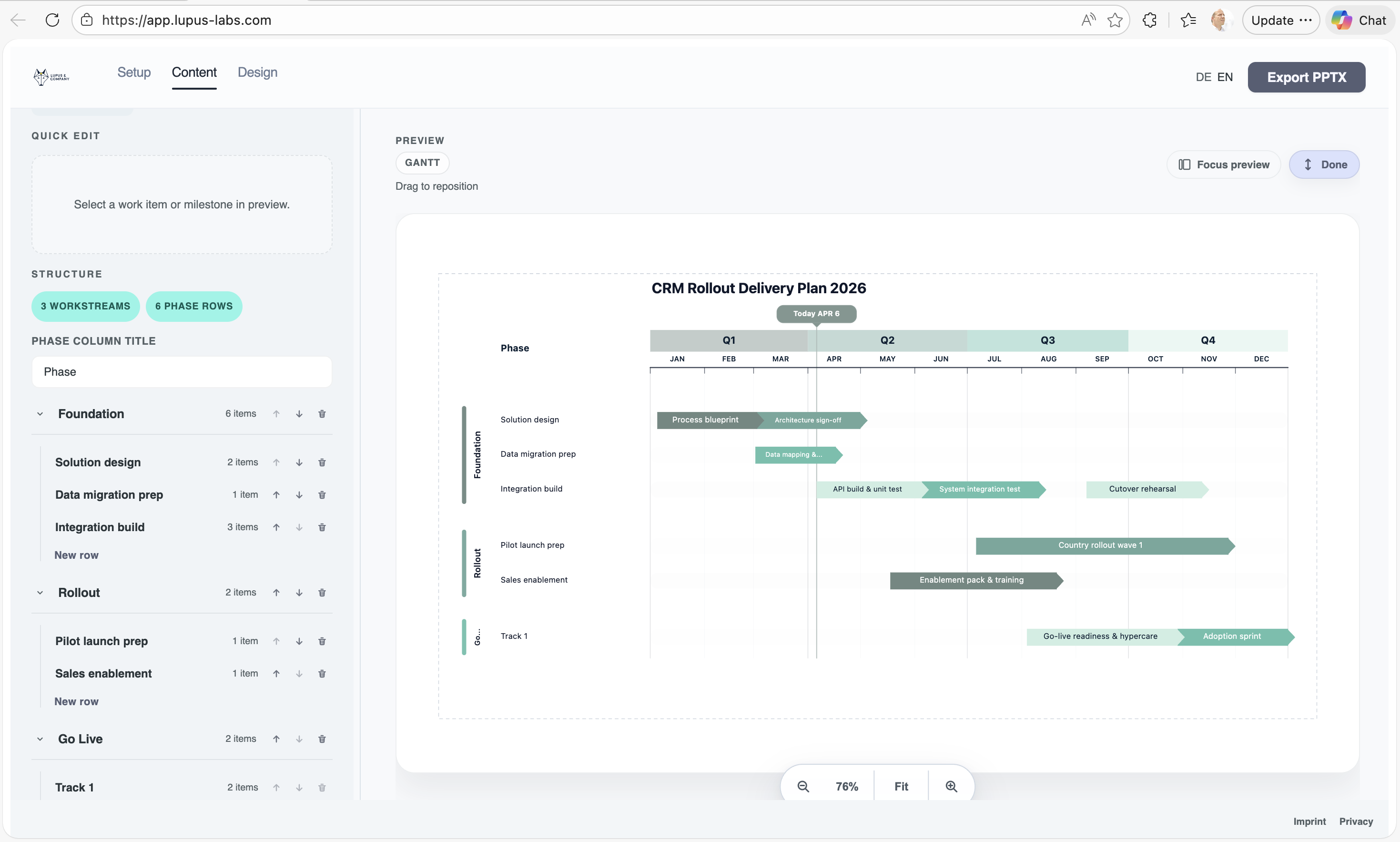
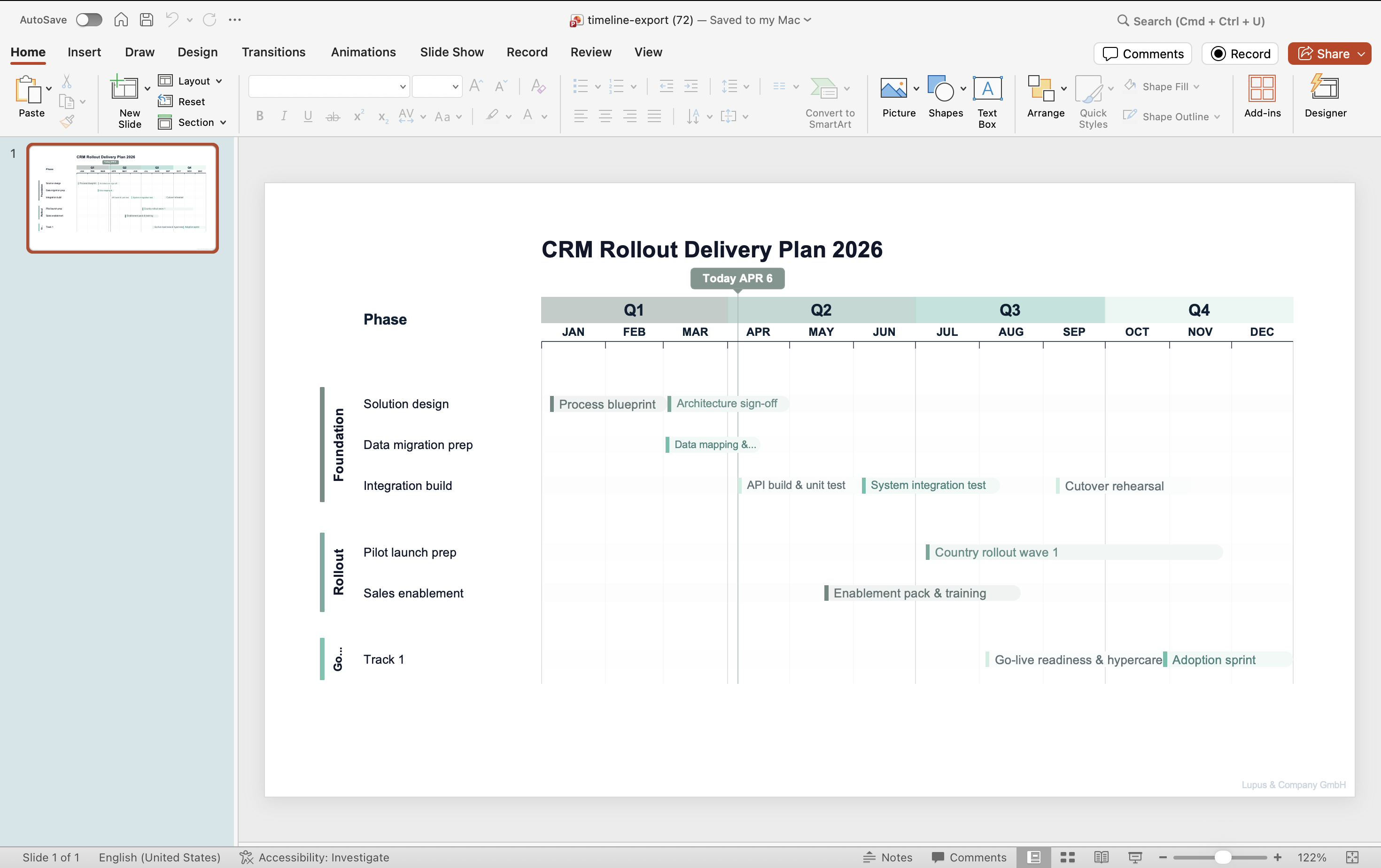
Lupus Labs takes the narrower path on purpose. You open the browser, build the roadmap, and judge the workflow by the quality of the slide you can export and carry into PowerPoint.

My practical rule is simple: if the job is one strong roadmap slide in a real deck, judge the tool by how quickly it gets you to a slide you would actually send.

Compare

How I would decide between the two

The fairest comparison is not feature-count versus feature-count. It is workflow fit versus the kind of deliverable your team actually owes this week.

Choose Lupus Labs if your job looks like this

  • You mainly need one polished roadmap or timeline slide, not a broad charting environment.
  • You want to try the workflow immediately in the browser instead of rolling out another add-in first.
  • Your team already finishes the last mile in PowerPoint, so the key question is how quickly you reach a credible first draft.

Choose think-cell if your job looks like this

  • You want a full PowerPoint add-in that covers many chart types beyond roadmap-style slides.
  • Your team already works deeply inside PowerPoint and values native in-slide tooling over a lighter browser flow.
  • You need features like broader chart coverage, Excel-linked automation, and a larger suite around presentations.

Practical takeaway

For roadmap-slide work, the better tool is usually the one that gets you to an executive-ready slide with the least setup and least cleanup. That is where Lupus Labs has the clearer edge.

Benefits

Where a leaner route helps in practice

The gain shows up in real project work: less tool overhead at the start, less cleanup before the deck goes out, and a faster path to the next update.

Faster first draft for roadmap-specific work

If the deliverable is one roadmap slide, the browser route gets you to a usable first draft faster than a broader evaluation of an add-in suite.

Cleaner evaluation around the real output

The comparison becomes more honest when you judge the exported slide itself: readability, structure, and how much finishing work remains in PowerPoint.

Lighter recurring update cycle

For monthly steering packs or recurring PMO updates, a narrower workflow often means less slide maintenance and less dependency on a bigger tooling setup.

Compare

At the end, the slide still has to hold up in the deck

A simpler workflow only matters if the exported slide already looks strong enough for a steering deck, client update, or internal review.

Lupus Labs browser editor used to build a roadmap slide before exporting it to PowerPoint
The browser editor is where the structure gets built quickly before the slide moves into PowerPoint for the final deck context.

FAQ

Questions that usually come up in the decision

When is Lupus Labs the better fit than think-cell?

Usually when the real deliverable is one roadmap slide and you want to judge the workflow on the finished slide, not on a larger add-in rollout. That is especially true for steering decks, PMO updates, and consulting deliverables.

What does think-cell still do better?

think-cell remains the stronger option when your team wants a full PowerPoint add-in with broader chart coverage, richer in-slide tooling, and features like Excel-linked automation across many chart types.

Can I still finish the slide in PowerPoint?

Yes. That is the point of the workflow. Use Lupus Labs to get to a strong roadmap draft quickly, then place the exported slide in PowerPoint and make the final presentation-level refinements there if needed.

Is this really a fair comparison if Lupus Labs is narrower?

Yes, because many teams are not choosing between two identical suites. They are choosing the shortest credible route to one roadmap slide. If that is the job, a narrower workflow can be the more sensible choice.

Try Lupus Labs

Test the workflow on a real roadmap slide

Build one slide in the browser, export it to PowerPoint, and judge the result on the page you actually need.