
Compare

PowerPoint roadmap vs Excel: different tools for different jobs

Excel may stay the planning system, but that does not make it the best format for leadership communication.

Compare

When a lighter workflow is the more practical choice

If both options can produce a roadmap slide, the better fit is usually the one that gets you to a usable result with less setup and less repeat friction.

Why teams start looking for an alternative

Excel is often the right place to maintain planning detail. The trouble starts when the same spreadsheet is expected to do the job of an executive slide in a meeting or steering pack.

  • Spreadsheet views are harder to scan in meetings and management presentations.
  • Reformatting spreadsheet logic into a slide usually adds manual cleanup work.
  • The storyline often gets buried when rows, columns, and detail compete for attention.
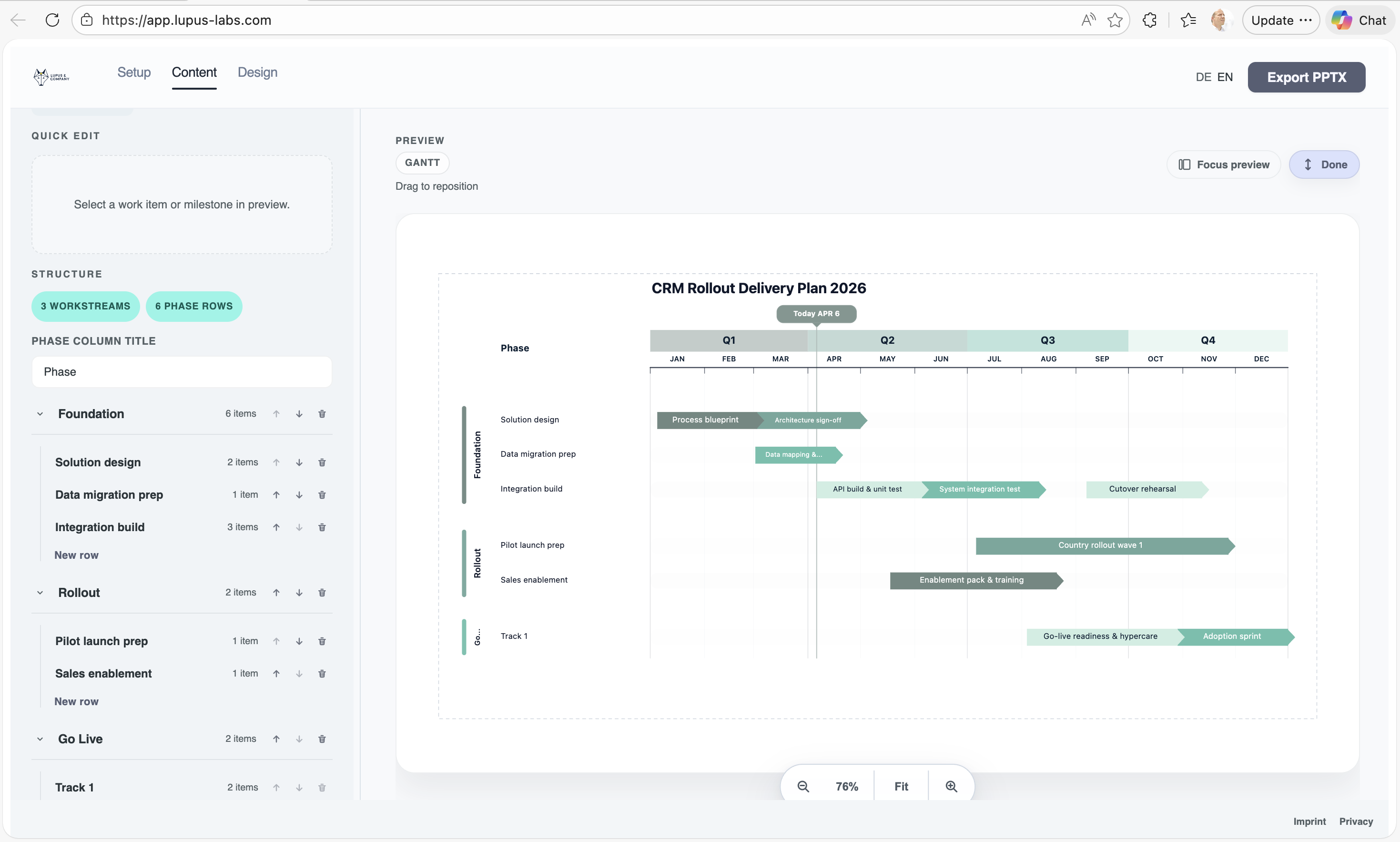
When the browser workflow is the better fit

Lupus Labs helps teams turn planning logic into a slide that is easier to present, discuss, and place into a PowerPoint deck without rebuilding the story by hand each time.

Excel can stay the planning system, but leadership conversations still need a cleaner roadmap slide than a spreadsheet view usually provides.

Benefits

Where a leaner route helps in practice

The gain shows up in real project work: less tool overhead at the start, less cleanup before the deck goes out, and a faster path to the next update.

Excel can stay where it is useful

You do not have to replace spreadsheet planning to improve how the roadmap is communicated in presentations and management discussions.

Better discussion quality

A roadmap slide makes it easier for stakeholders to react to phases, milestones, and sequencing instead of first decoding spreadsheet structure.

Less recurring reformatting

The workflow gets you to a presentation-ready view faster than reconstructing the same storyline from spreadsheet logic for every deck.

Compare

At the end, the slide still has to hold up in the deck

A simpler workflow only matters if the exported slide already looks strong enough for a steering deck, client update, or internal review.

Lupus Labs browser editor — build a presentation-ready roadmap slide without installing any add-in
A roadmap slide is usually easier to present and discuss than a spreadsheet view in a live meeting.

FAQ

Questions that usually come up in the decision

Should planning stay in Excel?

Often yes. Excel can stay the detailed planning view, while a roadmap slide becomes the communication layer for decks and management discussions.

When is a PowerPoint roadmap the better format?

Usually when the audience needs a clear overview, key milestones, and a stronger storyline than a spreadsheet can present cleanly.

When is Excel still the better choice?

Excel is still the better fit when the task is detailed planning, status tracking, or maintaining a working-level delivery view.

Try Lupus Labs

Test the workflow on a real roadmap slide

Build one slide in the browser, export it to PowerPoint, and judge the result on the page you actually need.